

Mezivo Reservations
Every reservation, on a live floor plan.
Stop running service from a notebook. Mezivo gives the whole team a bird's-eye view of the room: tonight's bookings, the guest's history and the state of every table on one screen, updated the moment anything changes.
- Tables and sunbeds
- Guest records and tags
- Several floor plans
- Free to start
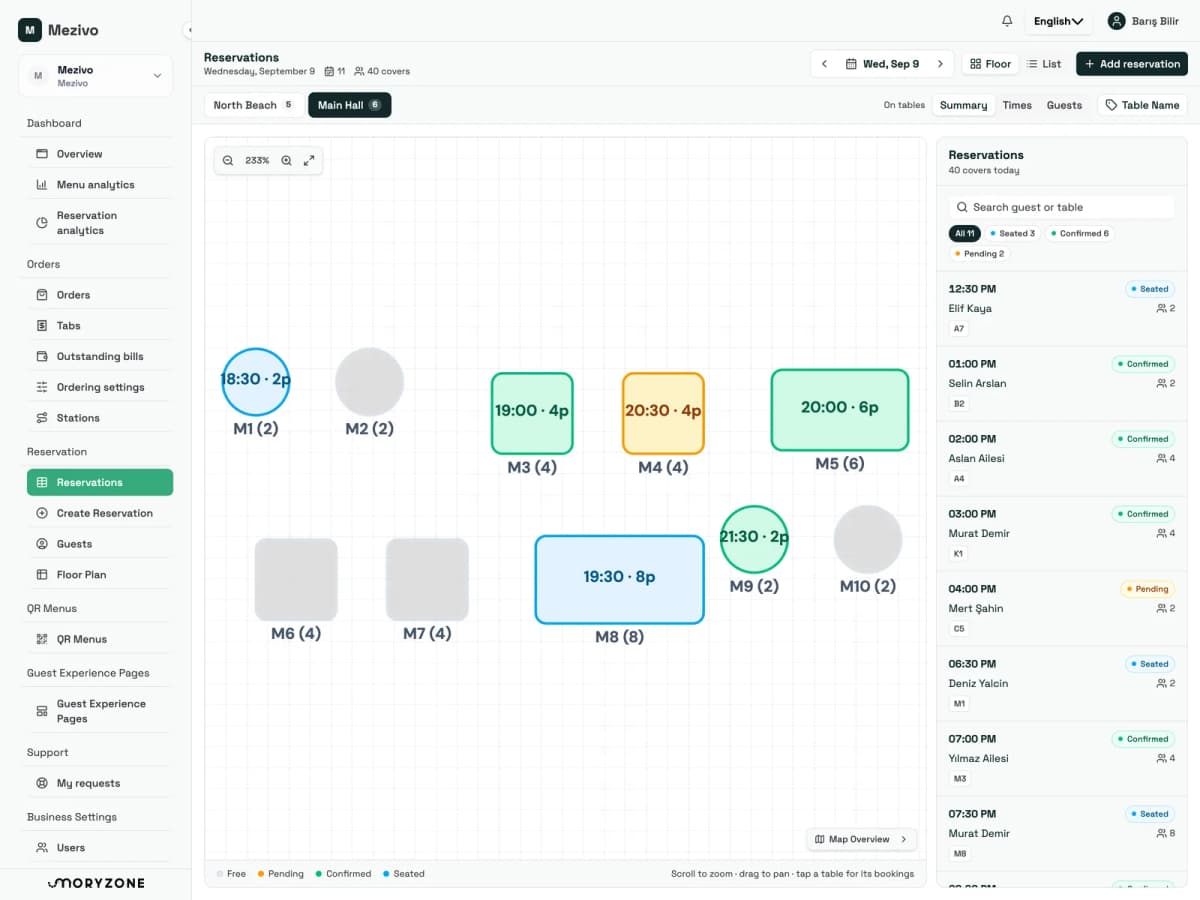
The whole team, one view
From the door to the kitchen pass
Built for any venue with a floor
Try it, this is the real workflow
Tap a table. That is the whole job.
This is how your floor looks in Mezivo. Switch floor plans, change what the overlay writes on each unit, and tap any table or sunbed to open its bookings for the day. It is exactly what your staff do mid-service.
Select a table or a sunbed
Its bookings for the day open right here, with no page change mid-service.
How it works
Taking a booking is five steps. None of them is a page load.
The whole reservation flow lives on the floor plan. A phone call, a guest at the door, a message on Instagram: the team enters it the same way every time.
- 1
Pick the date and the floor
Choose the day and the plan: main hall, terrace, beach. Work on the floor or in the list, whichever your team thinks in.
- 2
Tap the units on the plan
Select one table, or several for a large party. The overlay you choose writes capacity, time or the guest's name onto each unit.
- 3
Find or create the guest
Search your guest book, and if there is no record create one on the spot without leaving the reservation.
- 4
Add the details
Party size, duration, status, notes and tags. Birthday, allergy, VIP: whatever the kitchen and the floor need to know.
- 5
Save, and everyone sees it
The booking lands on every screen in the venue, feeds your statistics, and can be forwarded to your other systems by webhook.
What is inside
Everything the floor needs, nothing it does not.
Draw your venue once, run it all season.
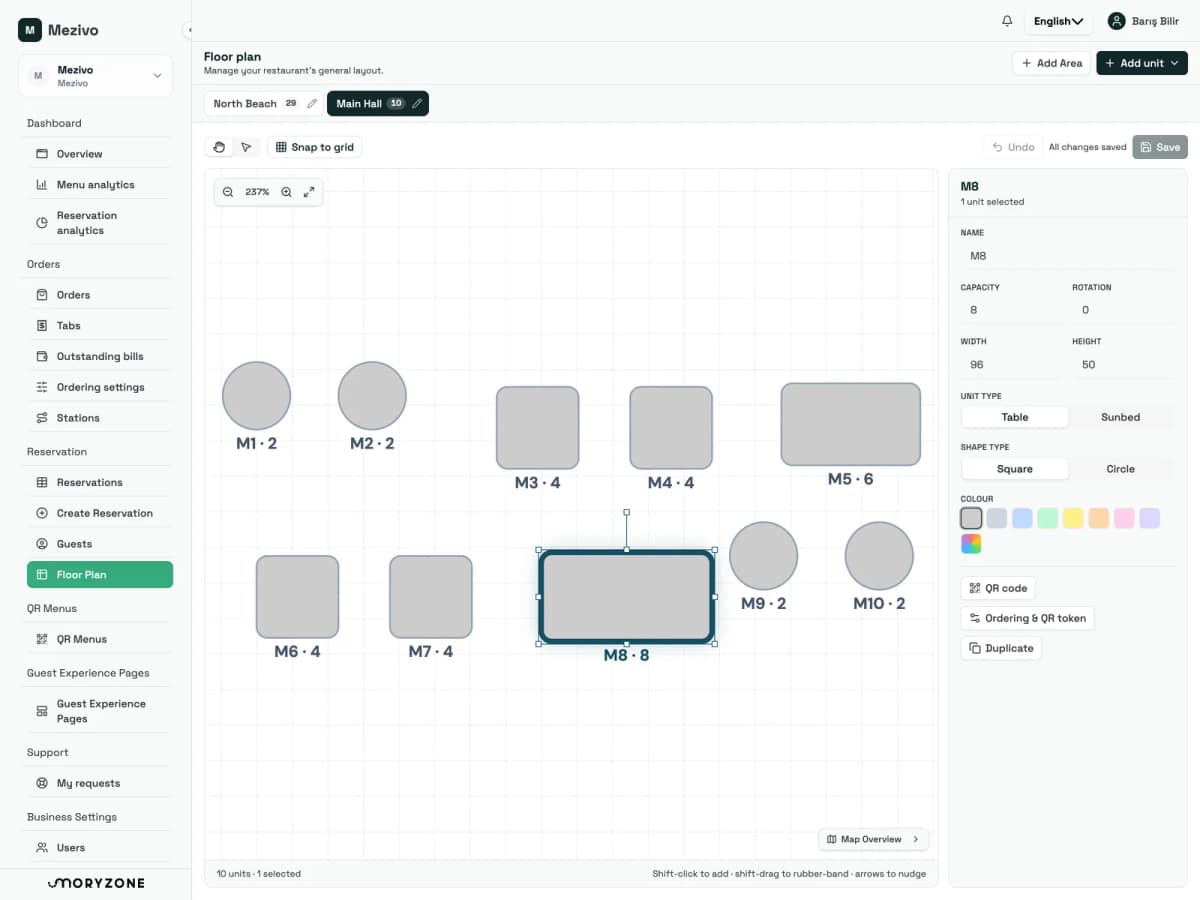
Main hall, terrace, beach: put your real layout on a canvas your staff read at a glance.
- Enter rows and columns and create hundreds of tables or sunbeds at once, named automatically
- Drag, resize and rotate units until the plan matches the real room
- Zoom to 300 percent, pan, and find your way around big layouts with a minimap
- Several floor plans per venue, switched with one tap
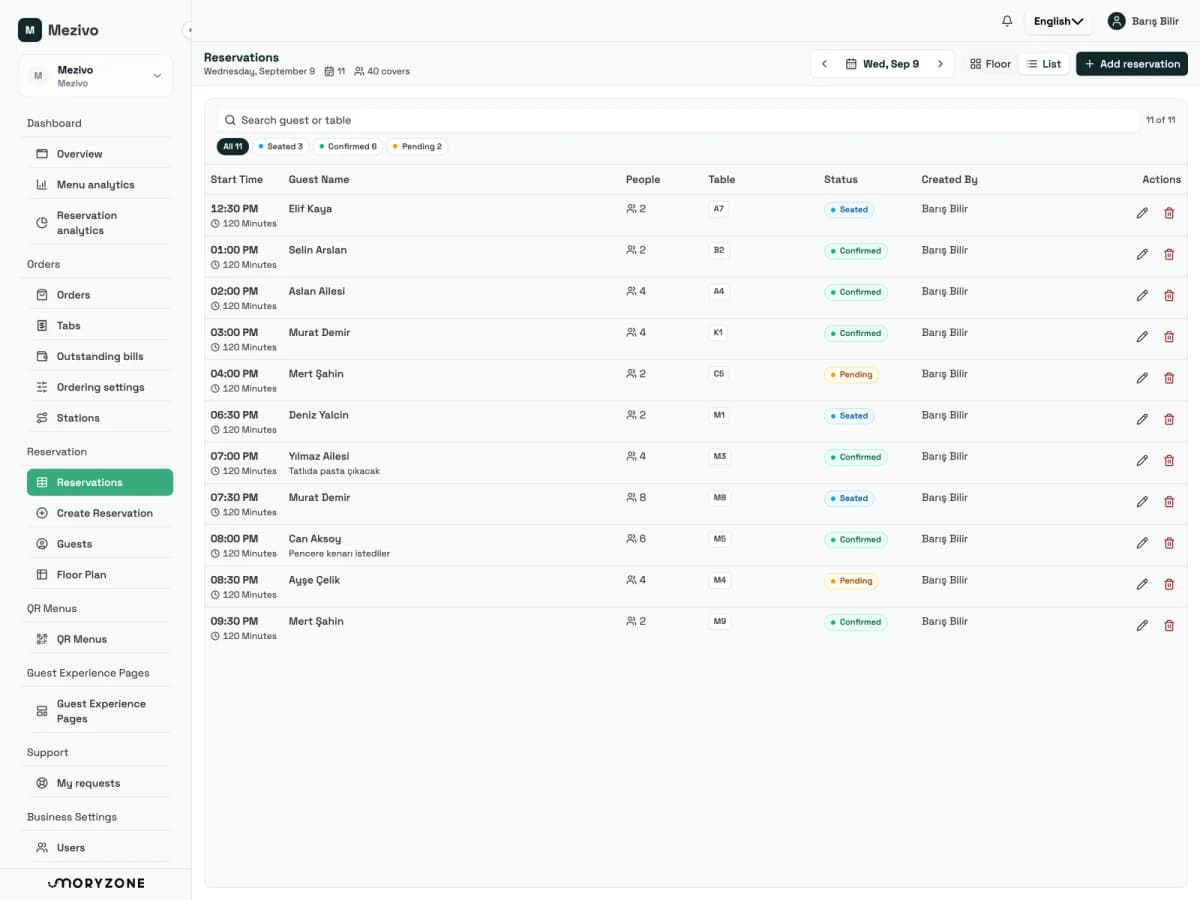
Read the rush at a glance.
Every booking for the day, on the floor or in a list, whichever your team thinks in.
- Tap a table and see every booking it has that day
- Choose what the overlay writes on each unit: capacity, time and party size, or the guest's name
- The side panel lists the whole day with status, tags and assigned units
- Assign one unit or several to a booking by tapping them on the plan
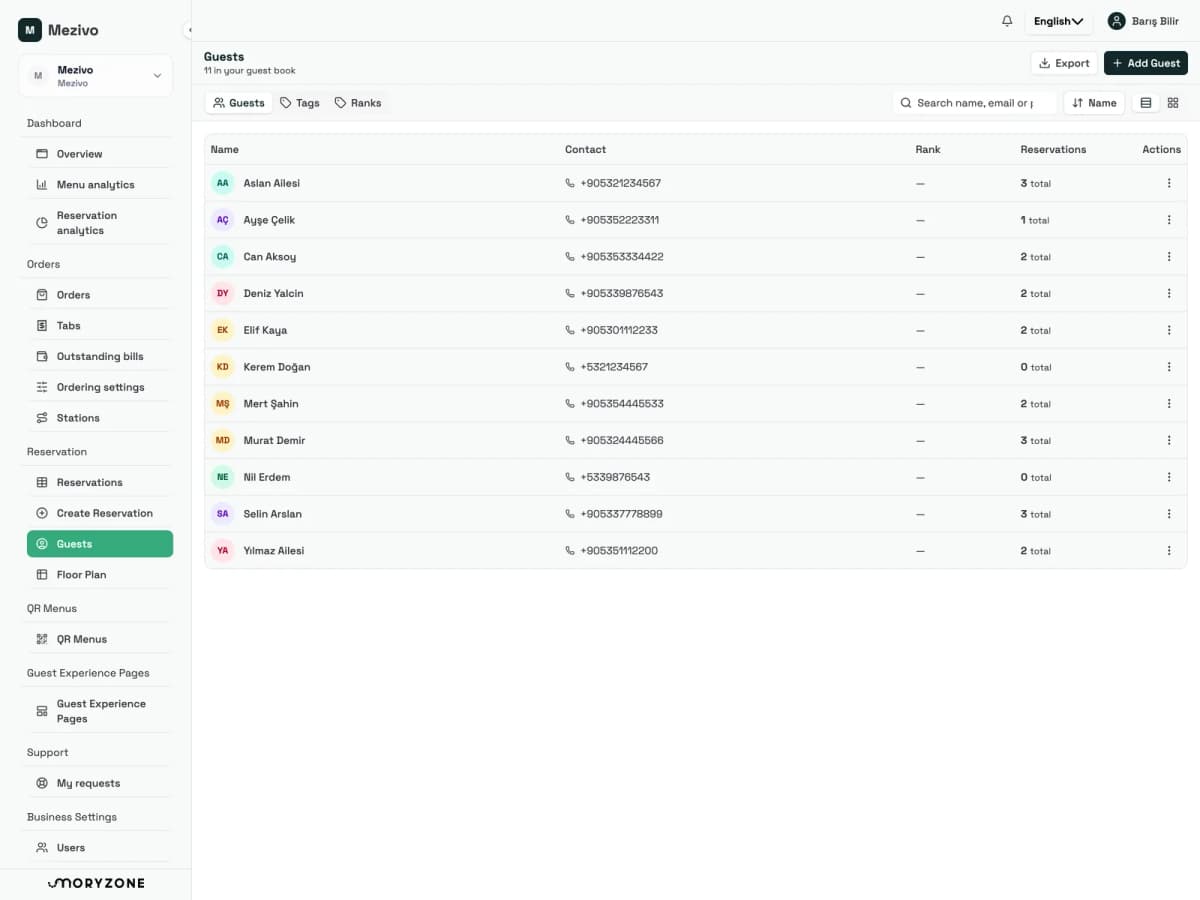
Know who is walking in.
Every reservation connects to a guest record your whole organization shares.
- Search an existing guest, or open a new record while you are still in the booking
- Tags for preferences, allergies and occasions travel with the guest
- Ranks tell regulars and VIPs apart from first-timers
- Notes and history are waiting on the guest's next visit
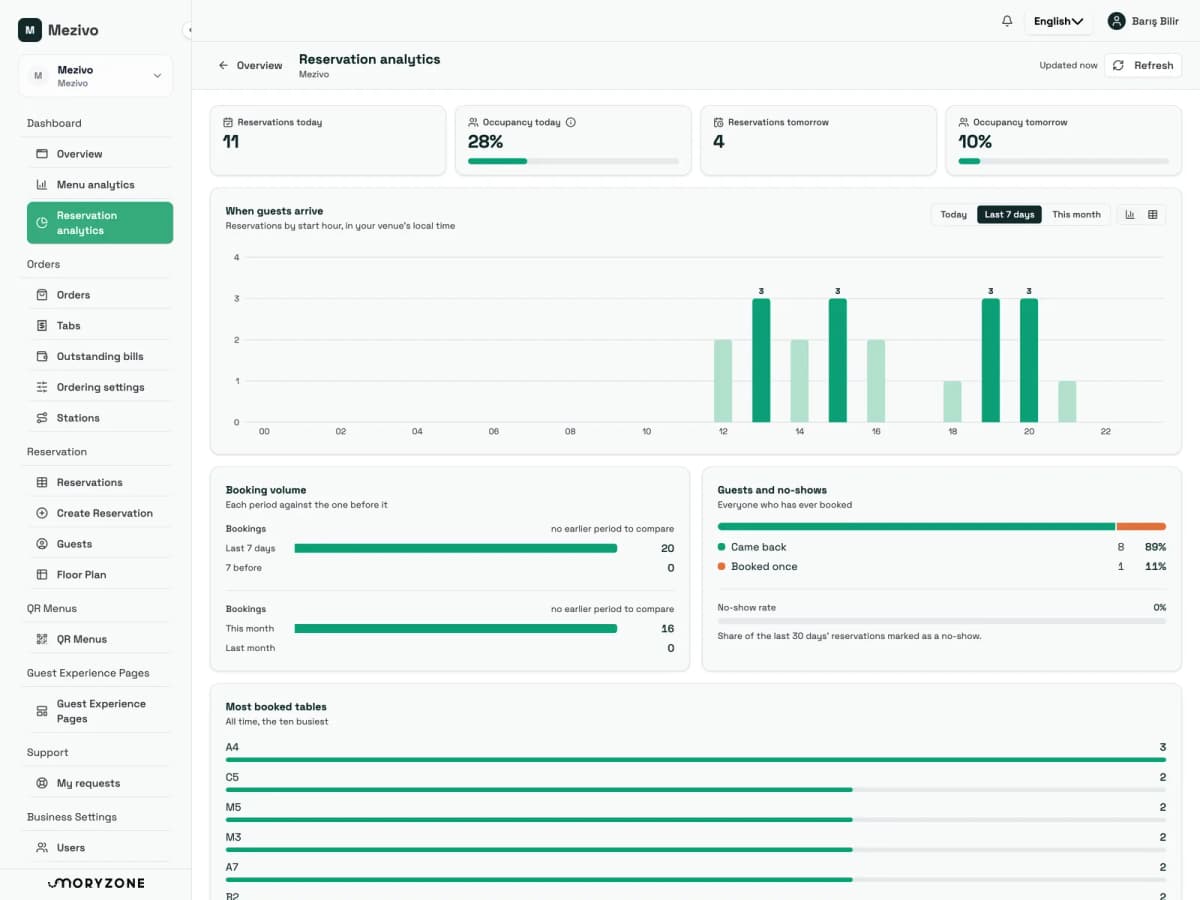
Read the night in numbers.
Reservation activity feeds your statistics directly. No exports, no separate spreadsheet.
- Today and tomorrow on one screen before service starts
- Occupancy per day, and the share of bookings that did not turn up
- Returning and first-time guests are counted automatically
- The most-booked tables and the hours your guests actually arrive
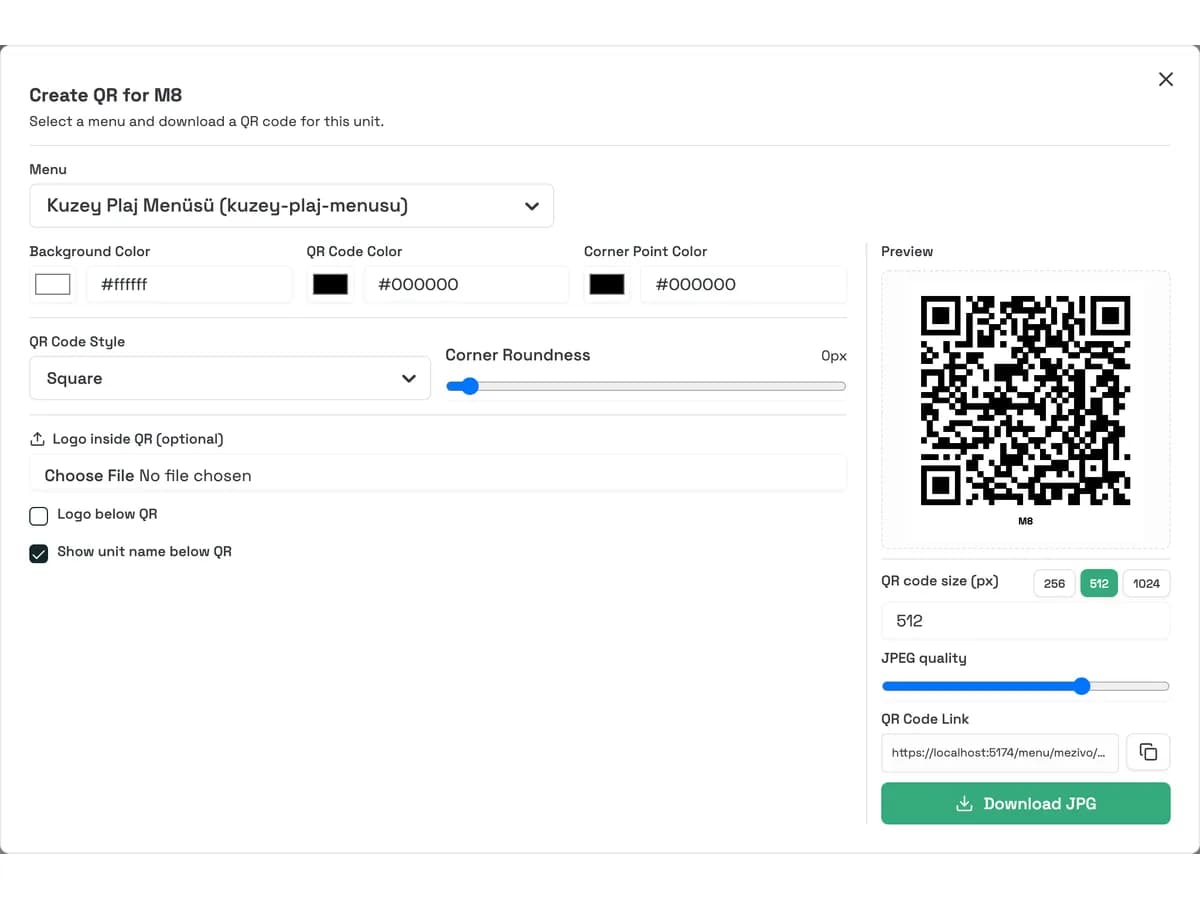
Every unit gets its own QR code.
Generate branded, table-aware QR codes straight from the floor plan. The menu opens with the table's context, and scans are reported per unit.
- Brand colours, pattern style, centre and footer logos
- Generate codes for many units at once and download a ZIP or a print-ready PDF
- Scan statistics per table and per sunbed
- A guest scanning at M5 sees the menu; you see M5 in the report
Reservations that leave the building.
Forward every reservation event to the systems you already run. No double entry, no end-of-night copy and paste.
- Created, updated and deleted events, configured per business
- Endpoint URLs and custom request properties are yours to set
- Failed deliveries are recorded for review
- Reporting, CRM or your own in-house tool, without a developer marathon
POST → your endpoint
{
  "event": "reservation.updated",
  "reservation": {
    "date": "2026-08-21T20:00",
    "partySize": 6,
    "status": "Seated",
    "units": ["M5"],
    "guest": "Aksoy"
  }
}
A day of service
From prep to close, one source of truth.
Before service
- Open today and tomorrow side by side
- Rearrange the floor plan for tonight's group booking
- Spot the VIP tag on the 20:00 six-top and brief the team
The rush
- A table is running long: move the next booking to M6 in two taps
- A walk-in? Tap a free table and add the guest on the spot
- A status change reaches every screen the moment it happens
After close
- Occupancy and no-shows land in your statistics on their own
- Guest notes are kept for the next visit, so regulars stay known
- Webhooks have already synced tonight's changes to your other tools
Teams and locations
The right access for every role and every venue.
Permissions
Viewing and managing are separate
Who can see reservations and who can create or change them are granted separately. Floor plans, guest records and integrations each have their own permission.
Several floor plans
One venue, many plans
Main hall, terrace, private room and beach each get their own plan, switched with a tab. Each plan remembers its position and zoom.
Several locations
One organization, every location
Run several venues from one account. Staff access is granted per location, and guest records are shared across the organization.
Why switch
Retire the reservation notebook.
The paper book
- "Who is on M5 tonight?" means flipping pages at the door
- A changed party size gets crossed out, and the next shift misses it
- Regulars depend on whoever happens to remember them
- The night ends with no record of occupancy or no-shows
With Mezivo
- Tap the table: its bookings, the guest and the notes open instantly
- An edit reaches every screen in the venue the moment it is made
- Tags, ranks and visit notes travel with the guest
- Occupancy, no-shows and returning guests are tracked on their own
One platform
Reservations are one screen of Mezivo, not a separate tool.
The same tables and sunbeds carry your QR menu, ordering and statistics. Start with what you need; the rest is a module away.
QR Menu
Every table and sunbed gets a branded QR code that opens the menu with its table context.
Learn moreQR Order
Guests order from where they are sitting, and the tab opens for the guest rather than the sunbed.
Learn moreReporting
Reservation distribution, occupancy and no-shows, next to your scan analytics.
Learn moreGuest Experience Pages
Hotel and boat guest guides, on the same QR code your guests already scan.
Learn moreQuestions, answered
Your team does, from the panel, on the floor plan or in the day's list. Every booking, change and cancellation is instantly visible to everyone on the same live view, so nothing lives in one person's notebook.
No. QR codes open your digital menu and guest pages. Requests that arrive by phone, by message or at the door are entered by your staff in seconds, with guest search and inline guest creation built into the flow. There is no guest-facing online booking screen today.
Yes. Tables and sunbeds are both reservable units. You can create a whole beach grid at once, drag units to match the real layout, and give each sunbed its own QR code and scan statistics.
Reservation created, updated and deleted events can be forwarded to any external system through configurable outbound webhooks, so nothing has to be entered twice.
Reservations, floor plans and guest records are part of the venue operations tier, and can be added to other plans as a module. See the pricing page for current plans.
Yes. Each venue can have several floor plans: main hall, terrace, beach. One organization can run several venues, with staff access granted per location.
See your floor the way Mezivo does.
Set up your floor plan in minutes, add tonight's bookings, and give the whole team the same live view. Free to try, no card required.