

QR Order
Let the guest scan and order. The tab belongs to the guest, not to the table.
The guest scans the code on the table or the sunbed and orders from the QR menu already open in front of them. The order reaches the staff board instantly: accepted, prepared, delivered, and written to a tab that travels with the guest. No separate app, no waiting for a server to look up.
Built on top of the QR menu you already have · Nothing for the guest to download
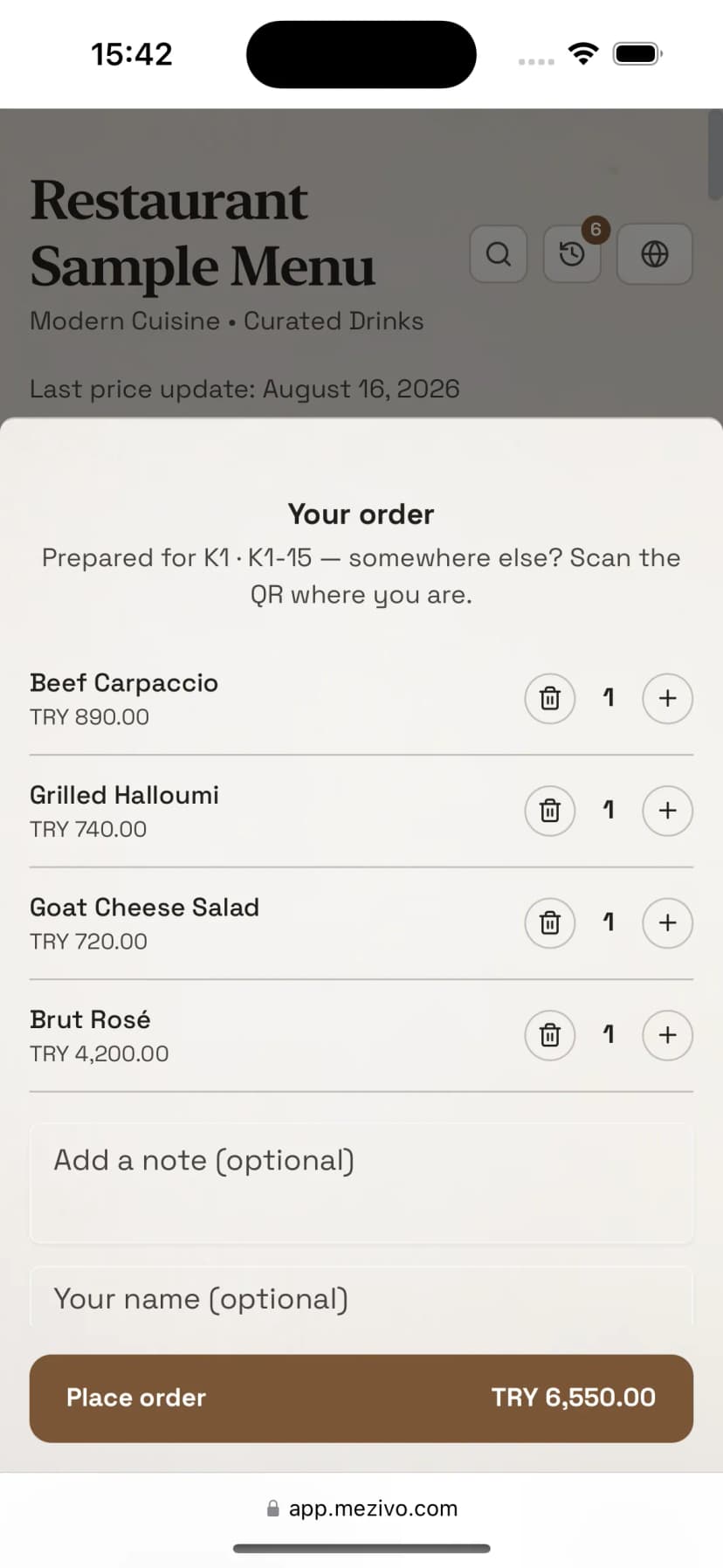
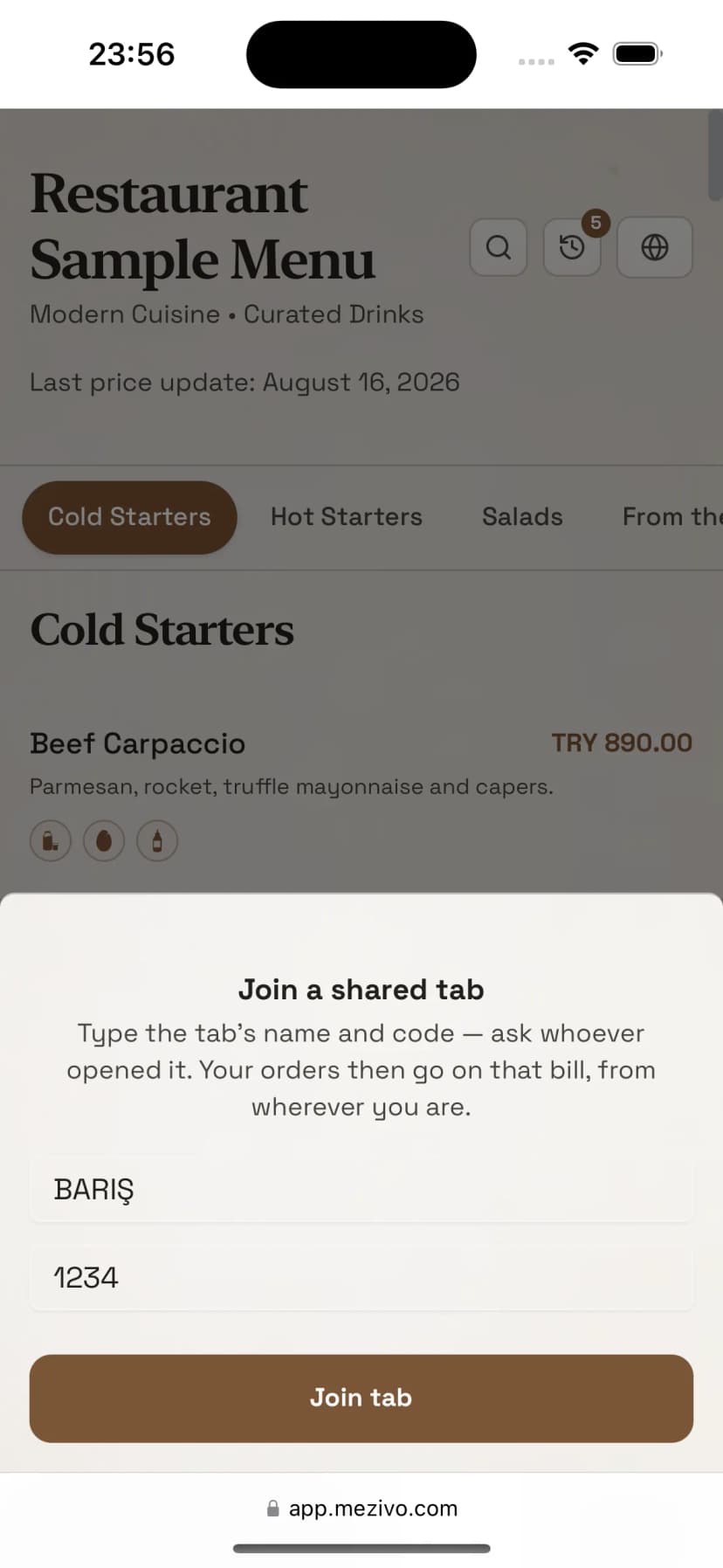
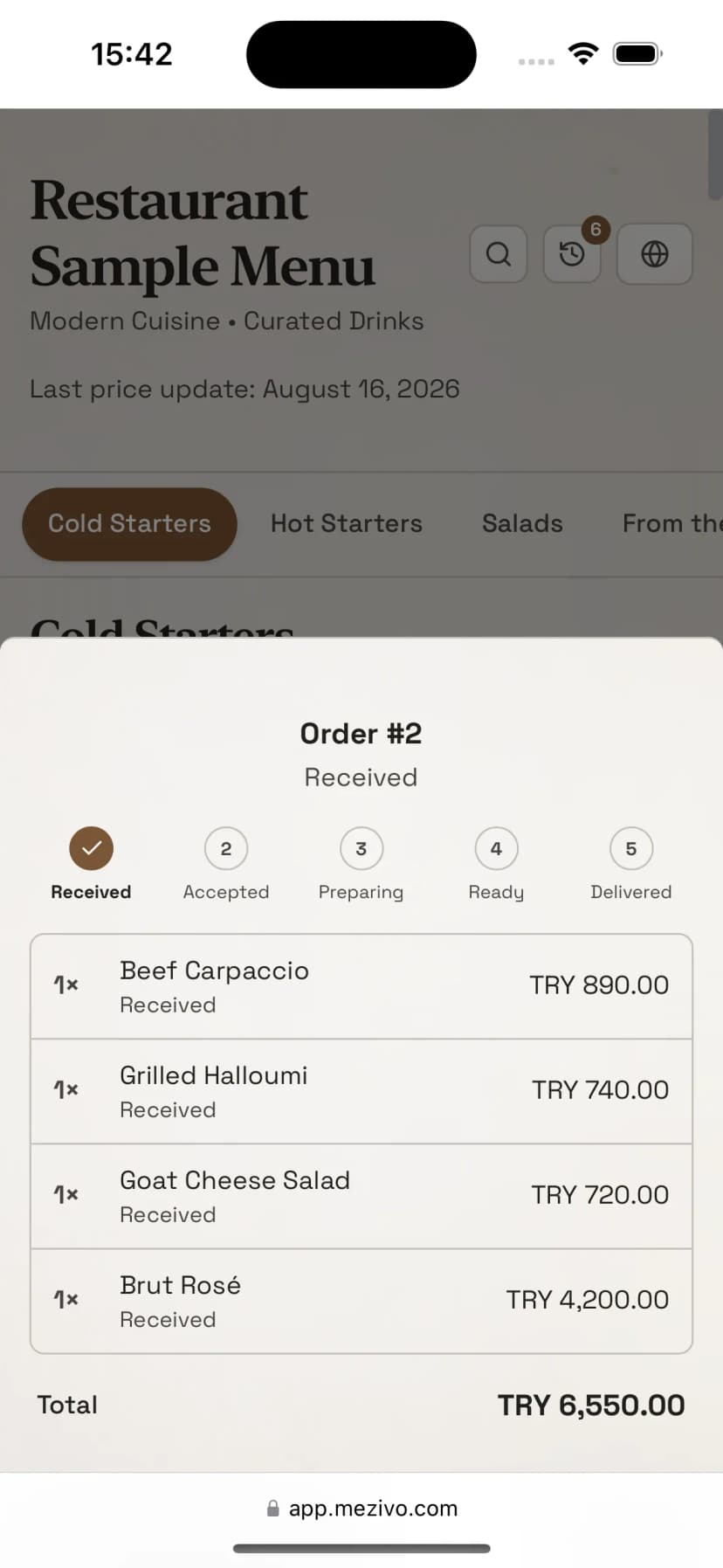
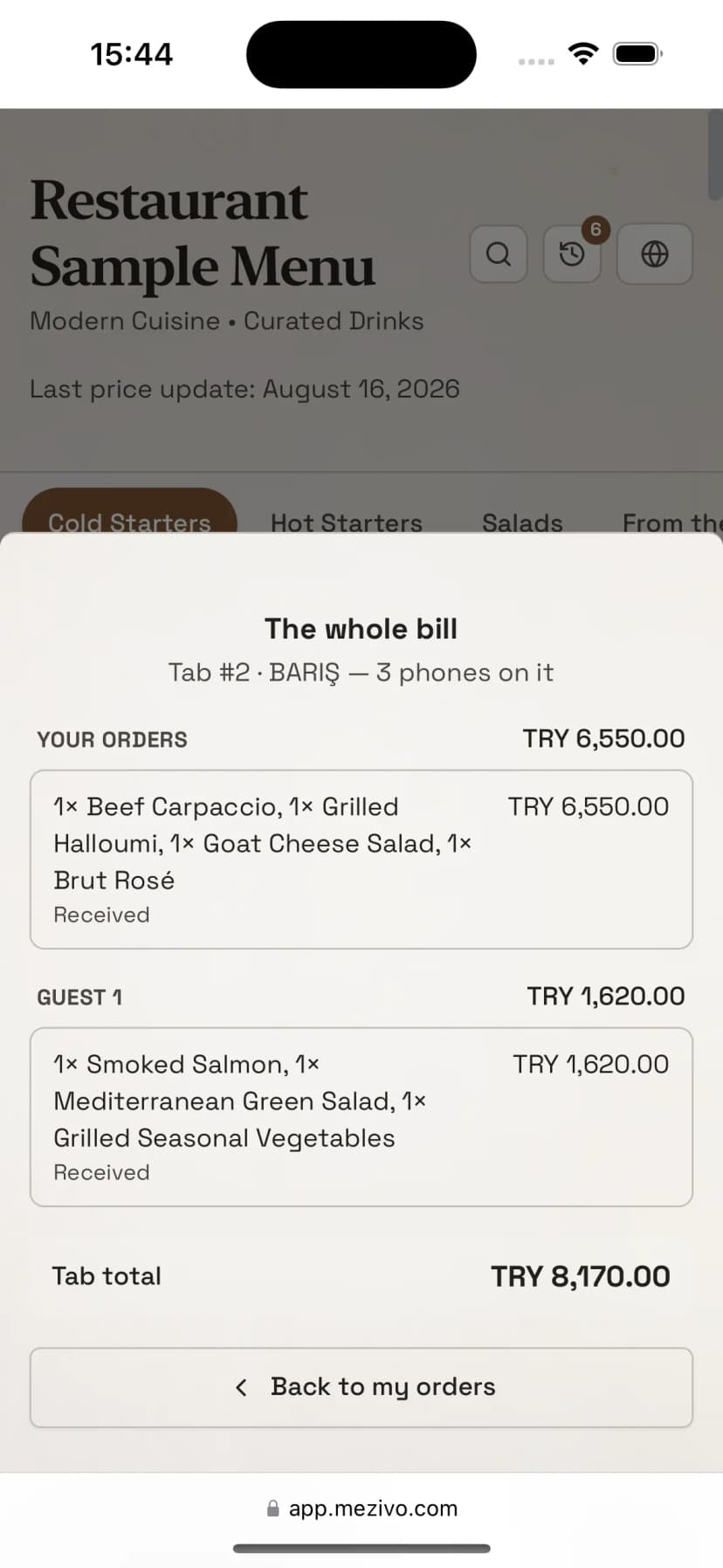
The guest fills the cart on the same QR menu they already scanned.
The problem
Why should an order be trusted to someone's memory before it reaches the kitchen?
A busy lunch service breaks down most often on the walk from table to kitchen. QR Order removes that walk: the moment an order is placed, it is on the screen of the person who will make it.
Waving at a server forty metres away
A guest on a sunbed either walks to the bar or waits to be noticed. A guest who waits orders less, and staff who run all day tire faster.
An order misheard over the noise
An order held in someone's head changes shape on the way across a crowded room. The kitchen squints at handwriting, the bar asks which table it was, and the wrong plate goes out and comes back.
Working out who drank what at the till
The couple who moved into the shade, two strangers sharing a double sunbed, a hotel guest ordering from the pool all week: tie the tab to a table or a sunbed and all of it runs together.
How it works
Scan, order, follow it on the board, close the tab with the guest
- 1
Scan
The code on the table or the sunbed opens the QR menu the guest already knows. All the code says is where the order should be carried.
- 2
Order
The guest fills a cart and sees, on the confirmation screen, where the order is going and which tab it will be written to. Prices are recalculated on the server.
- 3
Follow the board
The order lands on the live board: accepted, preparing, ready, delivered. The kitchen and the bar each see only the items routed to their own station.
- 4
Close the tab
Staff close a tab from the table or from the tab list. Several tabs close in one pass, together or separately, with nothing to merge first.
- 2 × Iced coffeeBar
- 1 × Prawn casseroleKitchen
Same tab, different place: lunch goes on the same tab and the whole thing closes once in the evening.
Schematic view. The real board is in the screenshot.
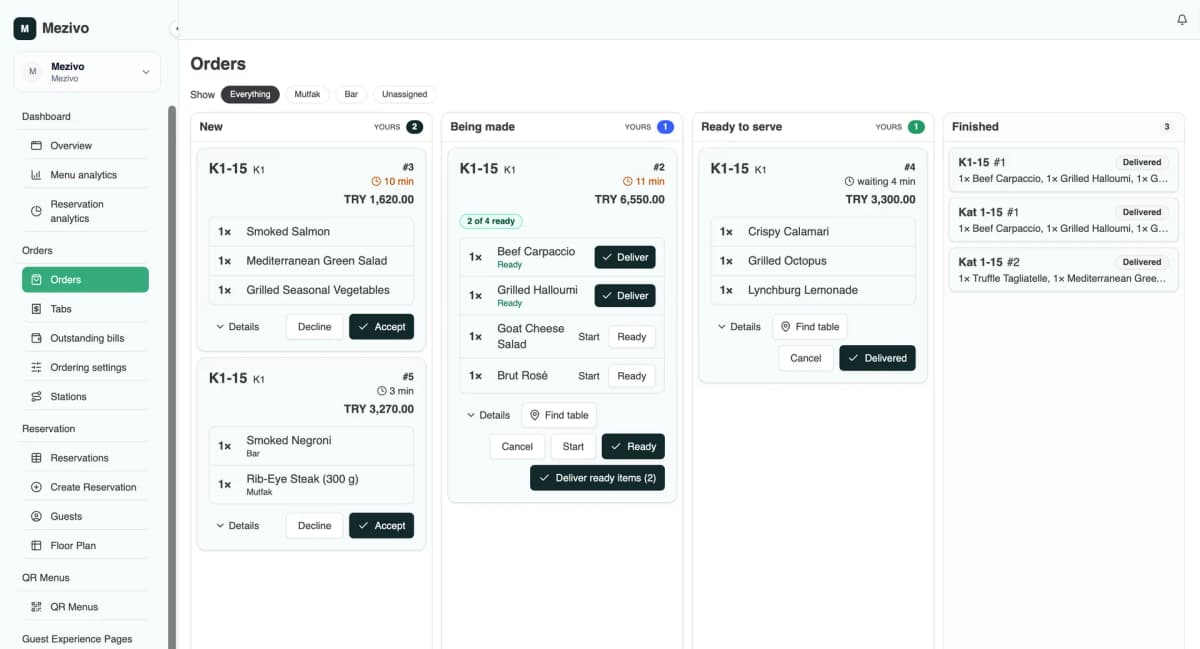
The tab
A tab opens for the guest, not for the table
Where a drink should be carried and whose tab it goes on are two different facts. Keeping them apart is what lets one tab travel with a guest from the sunbed to the pool bar to the restaurant, while two people at the same table keep separate tabs if they want to.
- Personal tab: opens by itself on a phone's first order.
- Shared tab: opens with a name and a short code; everyone in the group joins the same tab, and a guest whose phone was wiped rejoins with the same two details.
- Stay tab: opened at reception against the room, untouched by end-of-day closing, extendable if the stay is extended, settled at checkout.
- Reservation bridge: check-in opens the tab, the ordering link binds the guest's phone to it, and cancelling the reservation closes it.
For your venue
One module, working the way each venue works
Ordering rules are set for the business as a whole and can then be changed per area and per unit. A hotel can run one rule at the poolside and a different one in its restaurant.
Sunbed 42 orders without walking to the bar
The guest orders without waving at a bar forty metres away. The tab belongs to the group: the same tab covers the sunbed, the pool bar and lunch, and closes once at the end of the day. Staff see the sunbed name on every ticket, and a “nobody was there” cancellation flags the whole tab, so the next runner knows before setting off.
- The couple who moved into the shade keep their tab; two strangers on a double sunbed keep separate ones
- One zone code covers the whole beach, and staff can change it whenever they like
- On the strict beach setting, not a single item reaches a tab without a code staff handed out
The strict beach preset: staff open a tab for each group and hand over its code. Even a guest whose phone was wiped gets back to their tab with the same name and code.
A week of orders arrives at reception as one tab
A stay tab is opened at reception against the room; the pool, the bar and the room all order onto the same tab, settled at checkout. It is untouched by end-of-day closing, and if the guest extends the stay the tab extends with it, along with the phones bound to it.
- A week of orders arrives as one tab, not seven
- Tied to the reservation: check-in opens the tab, the ordering link binds the phone to it
- The poolside can run one rule and the restaurant another
An all-inclusive property that charges nothing shows no amounts to the guest or the till; the orders are still recorded for reporting.
Scan and order, no code needed
Two people at the same table can keep separate tabs without telling anyone, and the till closes several tabs together by ticking them rather than merging them. The kitchen can start one item without starting the whole order: drinks and mains leave their own stations independently.
- A personal tab opens by itself on the first order
- The kitchen and the bar each see only the items routed to them
- Accept, start, ready and deliver, item by item
The relaxed restaurant preset. The right starting point for any venue where staff can see the table with their own eyes.
A single coffee and several rounds, same flow
Nothing to download, and no waiting for a server to turn around. A quick coffee and several rounds over a long night both build up on the same tab, and at a crowded bar the place on the ticket answers the question of which table it was.
- The order reaches the bar the moment it is placed, without waiting for someone to pass the table
- At peak hours, approve the first order to see the guest once and leave the rest open
- A per-table order cap keeps misuse bounded
The cautious preset: the first order waits for staff approval, everything after it is open.
A one-day code for a one-day event
The event area gets a zone code; guests enter it on their phone once and order. Because the code belongs to the area, it is changed when the event ends; tabs close on the nightly sweep, apart from the unpaid ones.
- The zone code is short and easy to say out loud; the protection is the attempt limit, not secrecy
- Five wrong attempts per phone and twenty across the area lock it for fifteen minutes
- The open tabs screen lists what went unpaid the next morning
The event preset. Where a POS is already in place, QR Order can run purely as the collection and routing layer and leave settlement in the other system.
Security and authorisation
Scanning a QR code, on its own, never puts a penny on any tab.
A QR code identifies a place; it says where the drink should be carried. It does not say whose tab it goes on, because anyone can photograph a QR code and the code stays there longer than the guest sitting at that table. A phone joins a tab only with something granted to it: a zone code, a tab name and code, staff approval, or a reservation link.
Axis 1
How does a phone earn the right to order?
Axis 2
Which kind of tab can an order go on?
Every setting is defined for the business as a whole and can be changed per area and per unit.
Four presets to start from
For venues where staff can see the table. Scan and order; the first order opens a personal tab on the phone, and any group that wants one sets up a shared tab.
Staff open a tab for each group and hand the code to the guest. Nothing reaches a tab without that code: not from a passer-by's phone, and not from the guest's own phone after it has been wiped.
For temporary areas. Guests enter the zone code on their phone once; the code is changed when the event ends.
For venues that would rather see a guest once than ask for a code every time. The first order waits for staff approval; after it, the phone orders freely.
What is protected
- A guest identity is a 186-bit random key generated on the server and held in an HttpOnly cookie; only its digest is stored server-side, and no code on the page can read it.
- A guest sees only their own orders, plus the shared tab they are on. Another group's tab is never visible under any circumstances.
- When joining a tab, a wrong name and a wrong code get the same answer in the same time; the tabs open in a venue cannot be found by trying them one by one at that screen.
- Zone code attempts are limited: five wrong tries from one phone, or twenty across the area, lock it for fifteen minutes.
- Prices come from the server, not from the cart. Staff actions are separated into permissions by what each one costs the business when it goes wrong.
- Cross-site request forgery is closed off with a strict origin allowlist and by refusing every content type other than JSON.
What is accepted on purpose
- An overheard code works. Codes get said out loud at the sunbed; the protection is the attempt limit, not the secrecy of the code.
- A photographed QR works, because a QR is a place and the place is public anyway. It sets the delivery point, never the tab.
- A guest who clears their browser data is a new phone as far as the system is concerned; what actually bounds misuse is the per-table order cap.
The system does not block it, but it shows staff
- The first order from a phone that has just joined a tab is flagged on the board, so the server carrying it knows who was added.
- Every item carries the place it was ordered from. An order from sunbed 18 on the sunbed 42 tab stands out.
- A “nobody was there” cancellation flags the whole tab; the orders after it are met with suspicion first.
- The tab screen shows how many phones are bound to it; four phones on a table for two is a question worth asking.
These are not oversights. They are deliberate, documented product decisions: rather than block a suspicious case, the system puts it in front of the person who should decide.
For your team
The board is shaped by permission, not by screen
Permissions are separated by what an action costs the business when it goes wrong. A seasonal runner gets a phone that can only say “delivered”; the till closes tabs without touching the kitchen queue.
Guest
Calls a server, waits, walks to the bar
Orders from where they are sitting; sees their own orders and the shared tab total.
Runner
Ticket in hand, asking where this goes
One ready list, with the table or sunbed name beside every item and delivery in a single tap.
Kitchen / Bar
Squinting at handwritten tickets
Sees only the items routed to their own station; accepts and prepares them line by line.
Server
Takes the order, then keys it in as well
Opens tabs for groups, runs the board, moves items along.
Till
Trying to reconstruct who ate what
Closes from the table or the tab list; several tabs in one pass, together or separately.
Reception
Chasing room extras
Opens a stay tab against the room; extends it when the guest extends the stay.
Owner
Runs the place on guesswork
Every order, amount, item, place and time is kept as a permanent statistic.
Eight permissions, assigned to whichever role you like
Station assignment is separate from permission: putting someone on the bar narrows what they see, not what they can do. An item routed to no station stays visible to everyone, so no work disappears quietly.
- View orders
- Prepare orders
- Deliver orders
- Cancel orders
- Approve guest orders
- Manage tabs
- Close tabs
- Order settings
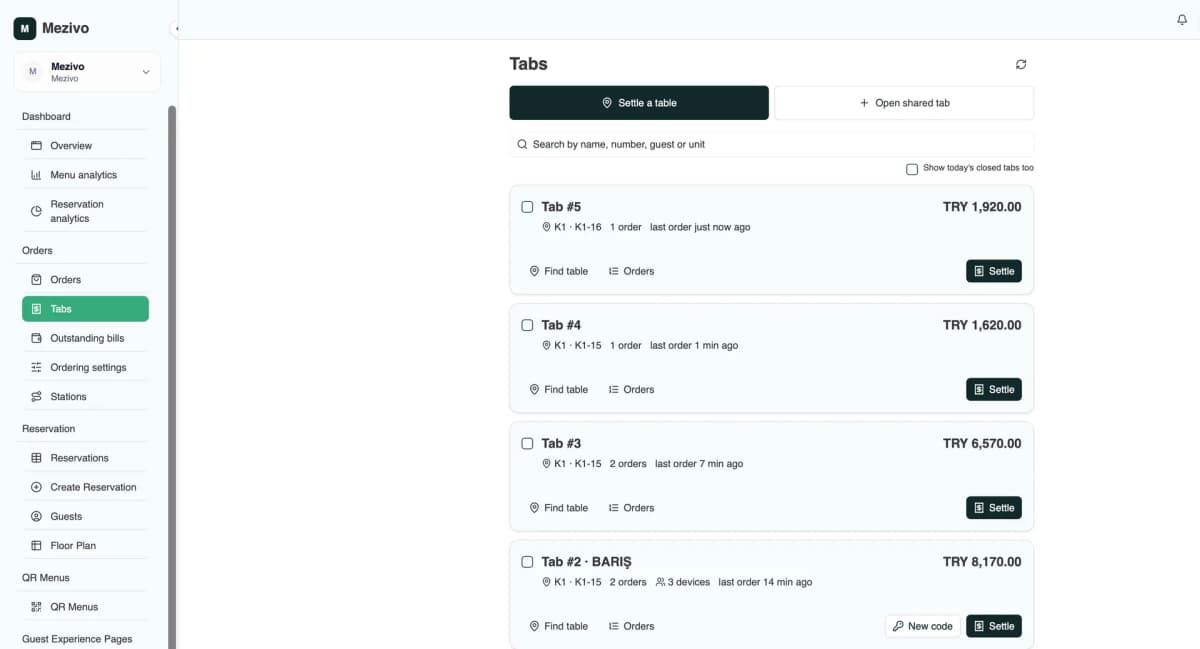
Money rules
Six rules the till can lean on
- An order is worth exactly the items on it. Delete an item, even a delivered one, and it comes off the tab as well as the ticket.
- Only a person can close an unpaid tab. The nightly sweep that closes forgotten tabs leaves anything owing alone, and carries the guest's phone into the next day.
- A tab closed by mistake reopens, and the paid marks on its orders are lifted with it.
- Correcting the record and reopening a tab are two different actions. Recording a late payment does not put a closed tab back into service.
- The open tabs screen lists every unpaid tab from every day, oldest first, with totals per currency.
- Totals are always computed from the orders, never kept alongside them, so no figure can disagree with another.
Privacy and retention
After twelve months the person is deleted, the statistics stay
Names, phone numbers, notes, tab names and free text are deleted; the order, the amount, the item, the time and the place stay for reporting. Guest devices unused for a long stretch are removed entirely, and failed code attempts are cleared every day. On a shared tab, other members appear as numbers rather than names: seeing the total does not mean seeing the people.
Deliberately not included
No guest payment inside the app; the tab is closed at the venue. No tab-merging tool; the tick boxes on the settlement screen answer the together-or-separately question. No “request the bill” button on the guest side. None of this is missing. All of it is decided.
QR Menu showed the guest the menu, Reservation managed the table. QR Order completes the link between them: not every request needs a person in the middle.
FAQ
About QR Order
No. The guest scans the same QR code they already scan for the menu and orders from their browser. There is no separate app, no account and no password. Guests arriving from the in-app browser in Instagram or Facebook are sent to the phone's own browser before they order.
No. Tabs are closed by staff at the venue, and no money moves through Mezivo. That is a deliberate product decision; your existing till and payment setup stays exactly as it is.
No. A QR code identifies only a place, and no phone is bound to a tab by scanning alone. A phone joins a tab only through a zone code, a tab name and code, staff approval or a reservation link. On the strictest setting, personal tabs are turned off entirely.
Yes. QR Order can be used purely as the layer that collects orders and routes them to stations, leaving settlement in your current system. There is an option not to mark open orders as served when a tab is closed, so the record of truth stays where it is.
The charging mode is set per venue, per area or per unit. A property that charges nothing shows no amounts to the guest or the till; the orders are still recorded for reporting.
Personal details are anonymised after twelve months; the order, amount, item and time statistics stay. Names, phone numbers, notes and tab names are deleted, guest devices unused for a long stretch are removed, and failed code attempts are cleared every day.
Your menu is already on a QR code. Move ordering onto the same code.
It is built on top of the QR menu you already have. Start with one of the four presets and fine-tune per area and per unit afterwards.