Nobody here yet
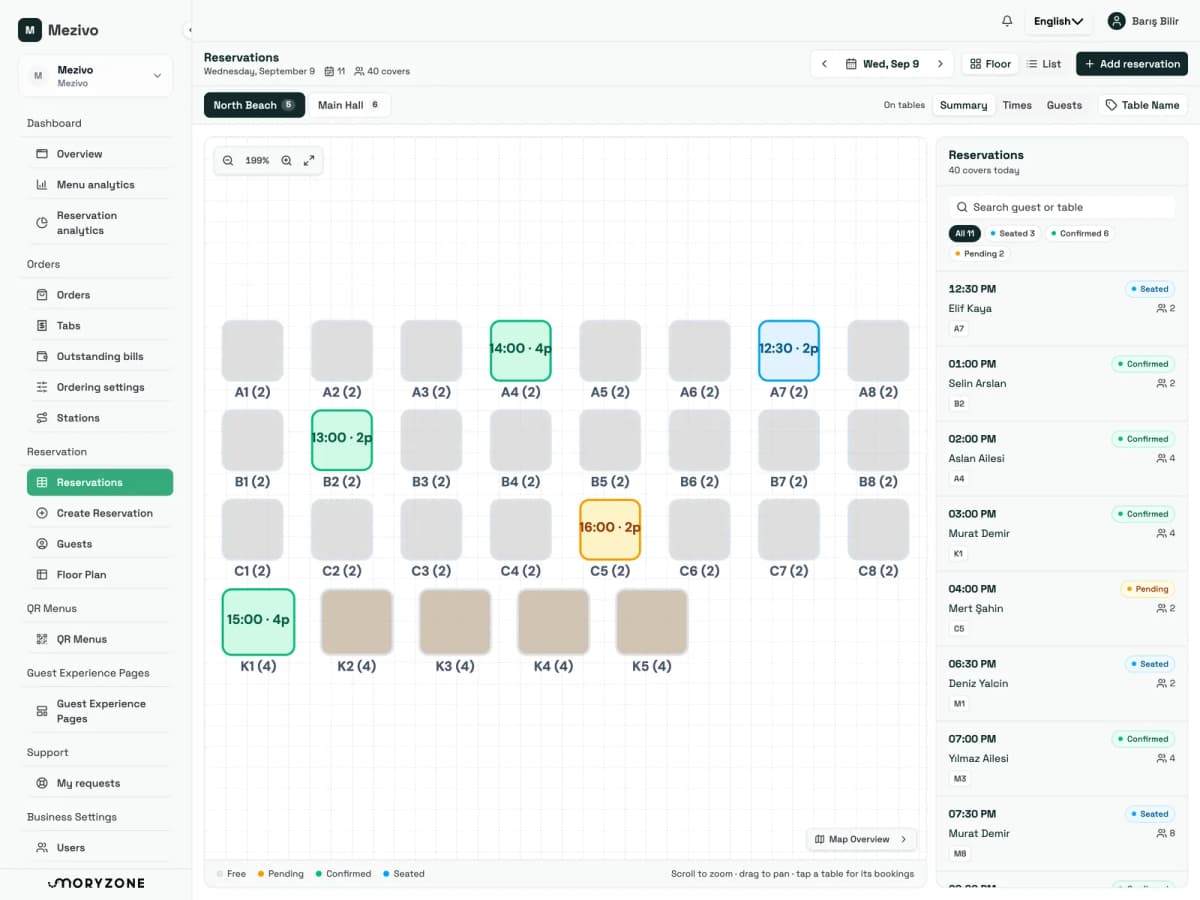
The Aslan family, who booked by phone last night, arrive at midday. Nothing on their phones yet; the code on the sunbed is waiting for them.


For beach clubs, hotel beaches and sunbed operators
You draw the plan once. Bookings land on it, an order from a sunbed leaves it for the bar, and the evening's report comes out of it. The guest never leaves the shade; the door staff, the runner and the till all look at the same plan. No radios, no paper tickets, no wasted walks across the sand.
Taken, no open order. The tab belongs to the group; if they move to a cabana it carries on from the same one.
Interactive example: tap the sunbeds, change the view with the selector above.
How a beach day runs
Tap through the hours and see what is happening on the guest's phone and on the staff board at the same moment.
The Aslan family, who booked by phone last night, arrive at midday. Nothing on their phones yet; the code on the sunbed is waiting for them.
The beach manager opens the plan: 12 sunbeds booked, 4 cabanas taken. Breakfast runs until 12.00; the scheduled-menu rule handles the rest.
A couple with no booking settle on B3. They scan the code on the umbrella pole; the menu opens in their own language. Two iced coffees, confirm, done.
The bar sees only its own items and makes them. On the ready list the runner sees the line "B3 · 2 iced coffees", carries it over and delivers it in one tap.
The door staff say "A4 and A5 are yours, your tab code is 4471". Four phones join the same tab; whoever orders, it goes on that one.
The door staff mark the booking as arrived and the tab opens by itself. On the Strict beach setting no phone can write to it without the code.
The couple move from B3 to a cabana, the family walk to the pool bar. Everyone orders from where they are; the tab travels with them.
Fourteen open orders on the board, each with its place beside it. A6 has a 15.00 booking and a walk-in is sitting there now. When live occupancy ships, that warning will be on the screen.
As the Aslan family leave, the till opens the "Aslan family" tab: the coffees at the sunbed, the fruit plate at the cabana, lunch at the pool bar. One bill.
The till closes a tab from the sunbed or from the tab list. Only a person can close an unpaid one; the nightly sweep leaves those alone.
Nothing permanent is left on the guest's phone: no app, no account. After twelve months the personal details go too.
Which row filled first, when the peak was, what sold most in the cabanas: next season's pricing and shift plan come out of this.
An August afternoon
In a restaurant the server can see the table. On a beach there are forty metres of sand between the bar and the back row, a hundred sunbeds, and guests who move around all afternoon. Every one of the problems comes out of that distance.
The guest either walks to the bar or waits to be noticed. A guest who waits orders less; the runner covers the same row three times.
A sunbed promised on the phone for 14.00 gets taken by another family at noon. The door staff check a notebook, the bar checks their memory, and the two do not agree.
The couple who moved into the shade, two strangers sharing a double sunbed, a family carrying on at the pool bar: tie the tab to the sunbed and by evening it has all run together.
Mezivo for a beach
QR Menu
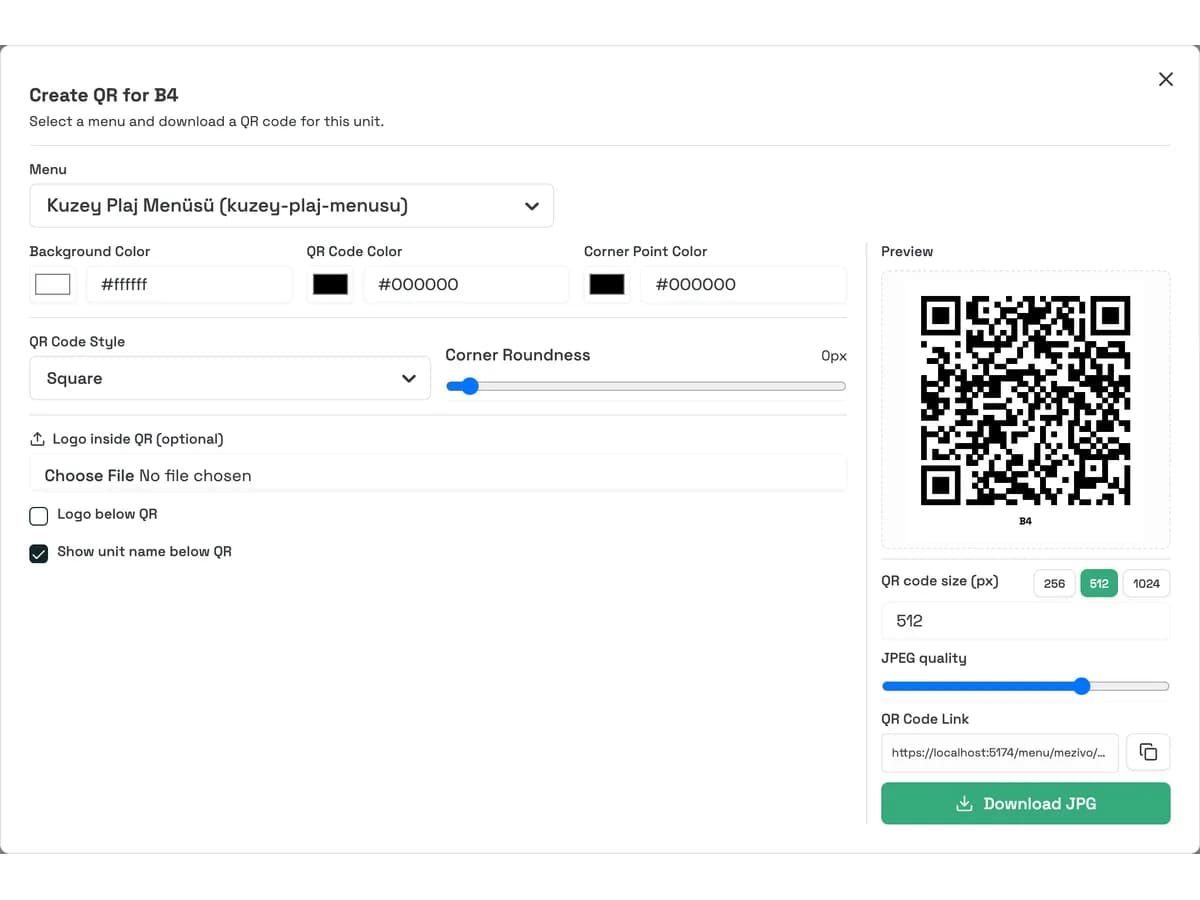
Food and drink on one side; sunbed, umbrella and cabana rates on the other. QR Menu puts both on the single code at every sunbed. The guest sees the current price without calling anyone, and staff change a sold-out item or a peak-hour price from one panel, updating the code on a hundred sunbeds at once.
Schematic view; prices are examples.
Booking and the plan
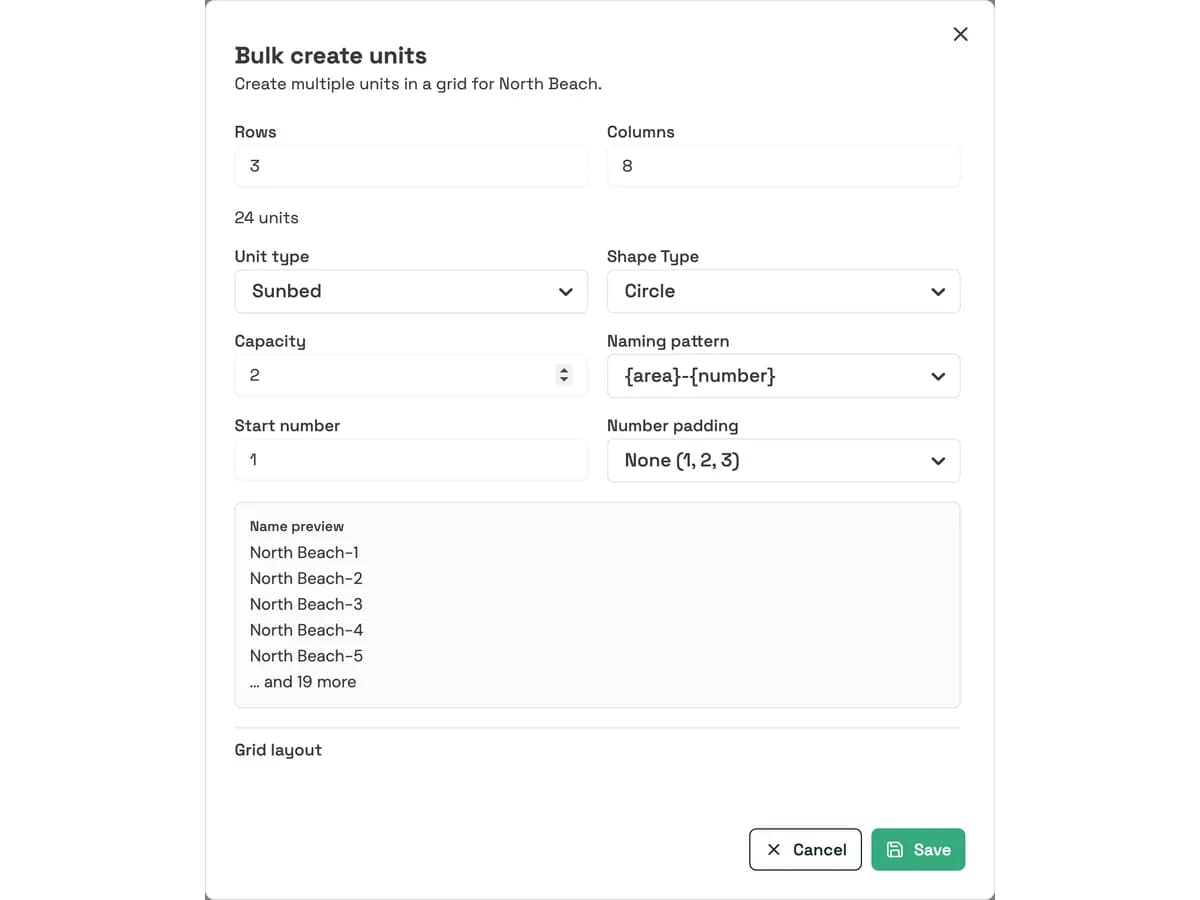
Enter the number of rows and columns and a hundred sunbeds appear at once; then drag them into the real layout. Every booking taken by phone, at the door or at a hotel reception lands on that same plan through Mezivo Reservation. A sunbed promised for 14.00 reads as booked hours before the guest arrives.
QR Order
The guest fills a cart from the menu already open and confirms. The order is on the bar's and the kitchen's screen that moment: accepted, preparing, ready, delivered. The runner sees one ready list, with the sunbed's name beside every item. With QR Order the tab opens for the guest, not the sunbed: the couple who move into the shade keep theirs, lunch at the pool bar goes on the same one, and it closes once in the evening.
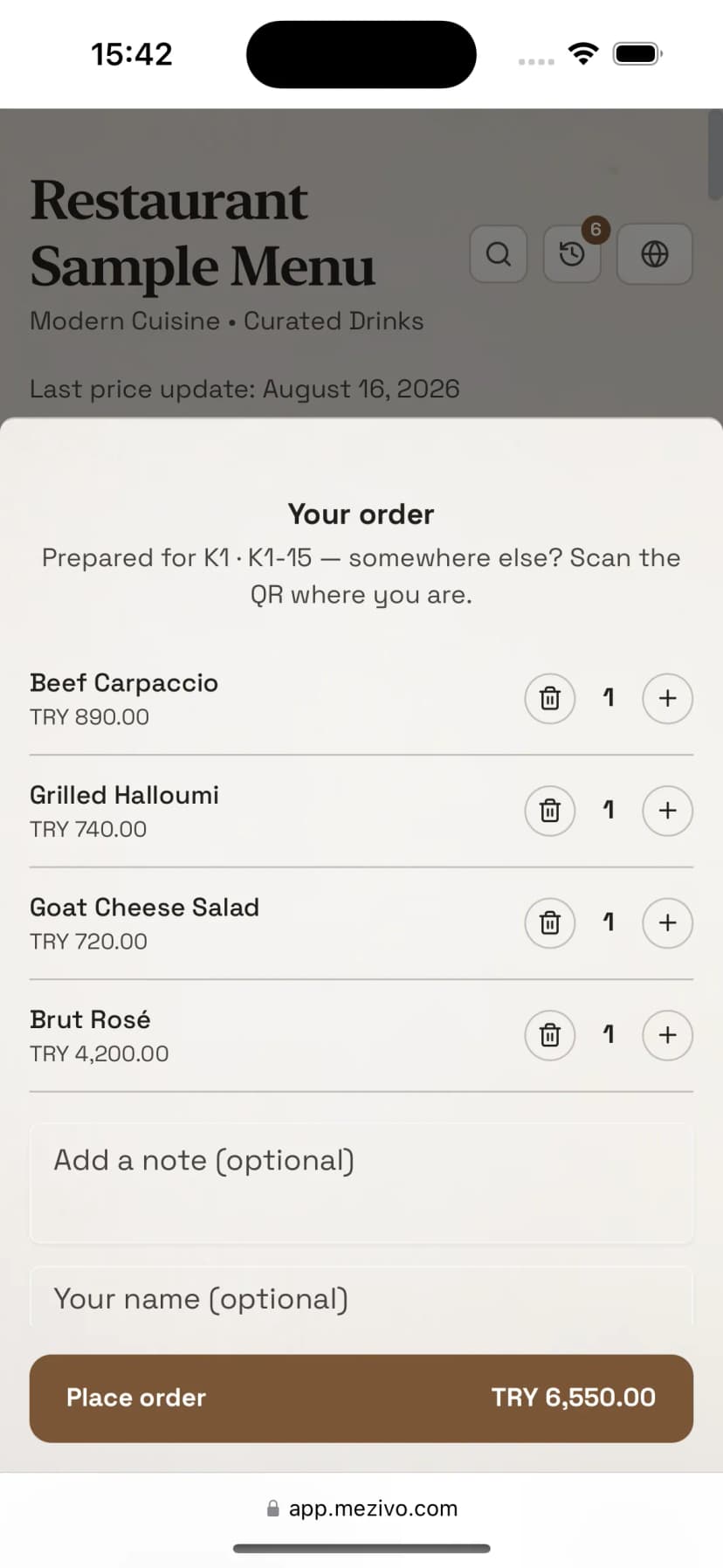
The guest fills the cart from the menu already open, and confirms.
Schematic view. The staff board is on the QR Order page.
Live occupancyComing soon
The booking plan says who is coming; it does not say who arrived. We are building live occupancy: the door staff seat a walk-in on a sunbed in one tap, and the first order from that sunbed marks it taken by itself. So the answer to "is there a free sunbed" is on a screen rather than on a radio.
Reporting
Every menu opening, every booking and every order is logged with its place and time. Mezivo Reporting shows which rows fill first, which hours need more runners on the sand, and which item sells in the cabanas rather than the front row. Next season's pricing and shift plan come out of it.
Example data, schematic view.
Security on a beach
On a beach nobody can see who is ordering from where, which is exactly why the QR code identifies only the place and never the tab. A phone joins a tab only with something granted to it. On the Strict beach preset, built for exactly this, staff open a tab for each party and say its code out loud; without that code nothing reaches the tab. Not from a passer-by's phone, and not from the guest's own phone after it has been wiped.
The zone code is short and easy to say out loud; the protection is the attempt limit, not secrecy: five wrong tries from one phone, or twenty across the area, lock it for fifteen minutes. The details are on the QR Order page.
Strict beach · preset
Personal tabs off, only staff open a shared oneThe guest arrives and the door staff say "Aslan family, code 4471". Everyone in the group joins the same tab; even a wiped phone gets back with the same two details.Zone code · alternative
One code covers the whole beachA short code given at the entrance is entered once per phone. The code belongs to the area; staff change it whenever they like, and hand out a daily one for daily events.Visible to staff
A suspicious case is not blocked, it is flaggedThe first order from a phone that has just joined, an item ordered from sunbed 18 on the sunbed 42 tab, and four phones on a place for two all stand out on the board.For the beach team
Permissions are separated by what an action costs the business when it goes wrong. A seasonal runner gets a phone that can only say "delivered"; the till closes tabs without touching the kitchen queue.
Checks a notebook, asks over the radio
Sees free and booked sunbeds on the plan; seats the guest, opens their tab, gives them the code.
Wanders the sand asking where this goes
One ready list, the sunbed's name beside every item, delivery in a single tap. No other permission at all.
Holds a shouted order in their head
Sees only the items routed to their own station; accepts and prepares them line by line.
Runs to everyone's question
Runs the plan and the board, works the bookings, changes the zone code, sees the tab worth a second look.
Adds up who drank what in the evening
Closes the tab from the sunbed or from the tab list; together or separately, with nothing to merge.
Goes on how the busiest Saturday felt
Reports by row, hour and item; next season's pricing and shift plan come out of them.
Setting up before the season
Enter the rows and columns and let the sunbeds name themselves; make the cabanas and the poolside their own zones.
Hand over a photo or a PDF of your current menu and let AI draft it; add the beach rates as their own category.
Generate each sunbed's code from the plan, export it branded, and fix it to the umbrella pole or the side table.
Start with Strict beach and give the team their permissions. Fine-tune per zone and per sunbed during the season.
FAQ
No. The QR code on the sunbed opens the menu in the browser, and the order is placed from that same screen. There is no app, no account and no password. A guest arriving from the in-app browser in Instagram is sent to the phone's own browser before ordering.
No. The QR code identifies only the sunbed's place. A phone joins a tab only through a zone code, a tab name and code, staff approval or a reservation link. On the Strict beach setting personal tabs are off entirely; without the code not one item reaches a tab.
Sunbed, umbrella and cabana rates are shown as their own category in QR Menu, so the guest sees the price. The rental charge is not added to the tab automatically; collecting it stays in your current setup. That is a deliberate product decision.
The charging mode is set per venue, per area or per unit. An area that charges nothing shows no amounts to the guest or the till; the orders are still recorded for reporting. The same hotel can run one rule at the poolside and another in its a la carte restaurant.
Bookings are put on the plan by staff; whether they come by phone, at the door or from a hotel reception, they land on the same plan. There is no guest-facing online booking screen today.
Live occupancy is in development. It will bring bookings, staff-marked walk-ins and open orders together on the same plan. Write to us through the contact form to hear when it ships.
Your guests order without leaving the shade; you run the zones, the team and the sales from one screen. Let us set it up together before the season opens.